
How to Run a Smooth Sports Tournament Schedule
How to Run a Smooth Sports Tournament Schedule (Without Paper or Chaos)
Running a sports tournament should feel exciting, not stressful. Yet most organisers experience the same issues every single time. Paper schedules become outdated almost immediately, updates are slow and unclear, and volunteers spend the entire day answering the same questions. Players crowd around the organiser's desk looking for clarity, and the event quickly feels disorganised.
The good news is that most of this frustration comes from a single root problem. The schedule is not centralised, visible, or easy to update. Once you fix this, everything else becomes smoother. This guide will show you the common reasons tournaments break down and how to run a calm, professional and efficient event using NowNext.live.
Why Tournament Scheduling Breaks Down
Let's be honest about what typically goes wrong at tournaments:
Last-minute changes disrupt everything
Matches run longer than expected, weather forces delays, or players withdraw at the last minute. When your schedule is written on paper or a whiteboard, even a small adjustment can cause major confusion.
That semi-final that was supposed to finish at 2:00 PM? It's now 2:30 PM and still going. Suddenly your entire afternoon schedule is thrown off, and if you're relying on printed sheets, you're stuck either reprinting everything or making endless announcements that half the players will miss.
The ripple effect is real. One delayed match can throw off the timing for the rest of the day, and without a flexible system, you're constantly playing catch-up instead of staying ahead.
Paper and whiteboards become inaccurate quickly
A printed schedule becomes outdated the moment the first game runs differently than planned. Whiteboards help a little, but rewriting information all day still leads to mistakes and miscommunication.
By mid-afternoon, your pristine morning schedule is covered in crossed-out names, arrows pointing everywhere, and notes that only make sense to the person who wrote them. Players squint at the board trying to decipher whether that says "Court 3" or "Court 8", and whether the crossed-out name means they're playing or not playing.
Different volunteers have different handwriting. Someone erases a bit too much. The marker runs out halfway through an update. What started as a clear communication tool becomes a source of confusion.
Players constantly ask "Who is on next?"
When players cannot clearly see the schedule, they rely on organisers for updates. This slows down everyone and disrupts the flow of the event.
You'll hear the same questions over and over: "What court am I on?", "When do I play?", "Has the schedule changed?", "Am I in the next round?" Each question takes time to answer, and while you're answering one person, three more are queuing up behind them.
This creates a frustrating cycle: volunteers are too busy answering questions to update the schedule, which means the schedule gets more out of date, which generates even more questions. It's exhausting for everyone involved.
Volunteers end up overwhelmed
Instead of running the event efficiently, volunteers spend the day rewriting boards and repeating information. They didn't sign up to be human information desks—they wanted to help create a great tournament experience.
Calculate the time cost: if a volunteer spends 15 minutes every hour updating a whiteboard during an 8-hour tournament, that's 2 full hours of manual updates. Time that could be spent greeting players, managing logistics, handling emergencies, or actually enjoying the event they're helping to run.
Multiply that across multiple volunteers and multiple tournaments, and you're looking at hundreds of wasted hours per year. There has to be a better way.
The Essentials of a Smooth Tournament
So what does a well-run tournament actually need? Here are the core requirements:
Everyone needs clear visibility
Players should never wonder where they need to be or when they're playing. A central live schedule removes uncertainty and keeps everyone informed.
When players can glance at a screen and immediately see their next match, their court assignment, and the approximate timing, they can plan accordingly. They know when to warm up, when to grab a drink, and when to be ready. This reduces stress for players and organisers alike.
Clear visibility also means players can check from anywhere—whether they're in the clubhouse, at the practice courts, or grabbing lunch nearby. They don't need to crowd around a single noticeboard.
Updates must be instant
If a round changes or a game finishes early, players should see that update instantly. This improves flow and reduces delays between matches.
Real-time updates mean you can adapt to reality as it happens. A match finishes 15 minutes early? Great—bring forward the next match and keep the tournament moving. A court becomes unavailable? Reassign matches to other courts and everyone sees the change immediately.
Instant updates also mean instant trust. When players know the schedule is always current, they stop second-guessing the information and start trusting the system.
A single source of truth is essential
One schedule must control every display. Multiple boards or sheets always introduce discrepancies, and discrepancies create confusion.
With a single source of truth, there's no ambiguity. The schedule on the TV in the clubhouse matches the schedule on the tablet at the desk, which matches what players see on their phones. Everyone is looking at the same information, updated in real-time.
This eliminates the classic tournament problem where the board in the main hall says one thing, the printed sheet says another, and the announcer says something completely different. One source, one truth, zero confusion.
Organisers should not be interrupted constantly
A well-designed system reduces the volume of questions and gives volunteers time to focus on running the event, not just answering the same questions repeatedly.
When the schedule is clear, visible, and trustworthy, players stop asking questions. They can find the information themselves. This frees up your volunteers to handle the things that actually require human attention: welcoming players, managing equipment, handling disputes, and creating a great atmosphere.
Your volunteers' time is valuable. A good system respects that by automating the routine communication tasks.
Step by Step: How to Run Your Tournament Using NowNext.live
Ready to run your smoothest tournament yet? Here's exactly how to set up and manage your event using NowNext.live. The entire process takes about 10 minutes, even if you've never used the system before.
Step 1: Create a New Event
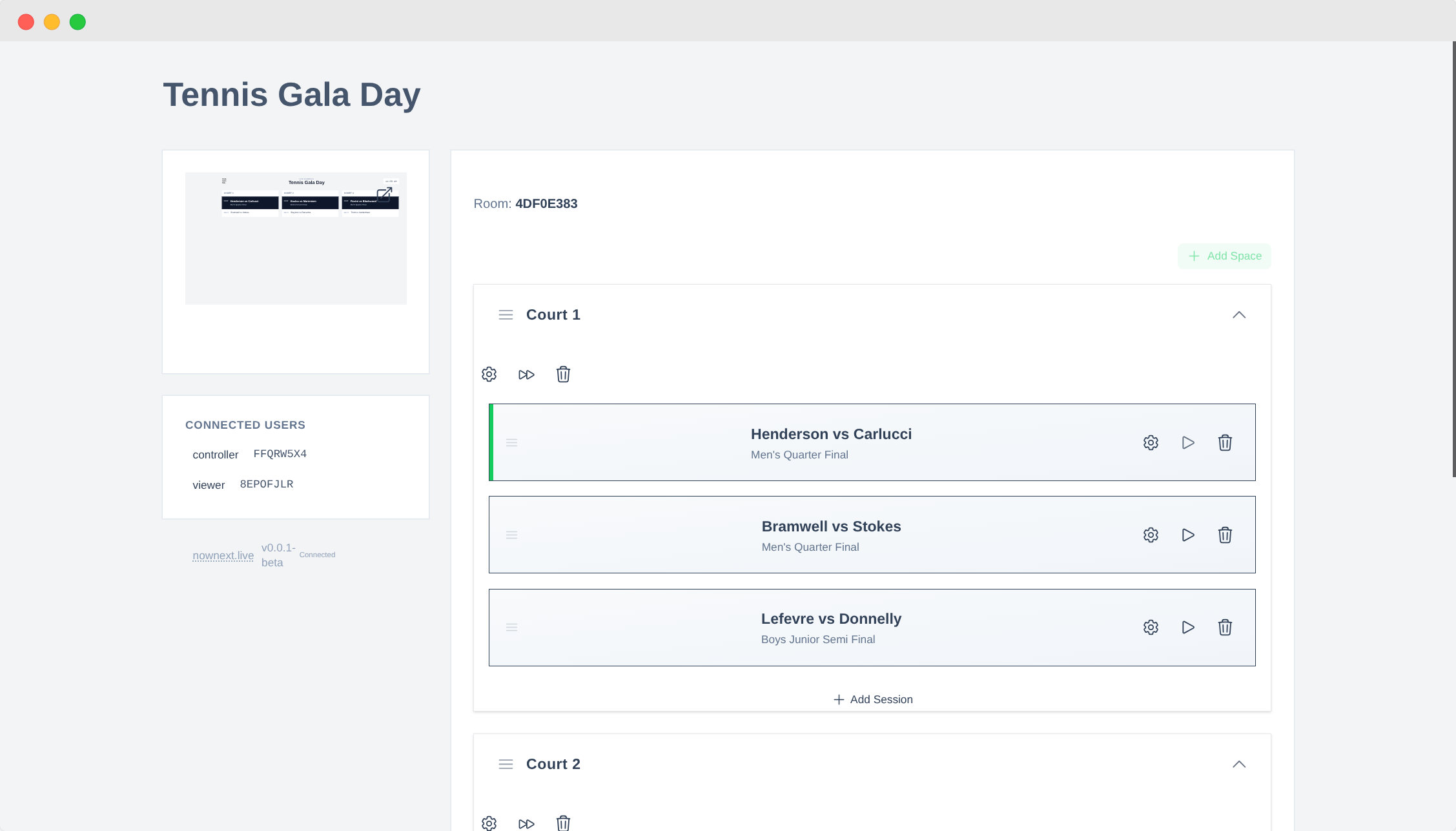
Getting started is straightforward:
- Log in to NowNext.live at nownext.live
- Select "Create Event" from your dashboard
- Enter your event name—something clear like "Spring Tennis Tournament 2025" or "Junior Badminton Championships"
- Your event is created immediately with one default space and session ready to customize
The system generates a unique URL for your event that you'll use for both controlling the schedule and displaying it on screens. This URL is the key to everything—keep it handy.
Give your event a descriptive name that you'll recognize later, especially if you're running multiple tournaments throughout the year. Good names make it easy to find past events when you want to use them as templates.
Step 2: Set Up Spaces
Now let's add your playing areas. In NowNext.live, these are called "Spaces"—they represent courts, rinks, lanes, pitches, or any area where matches happen:
- Open the Spaces section in your event controller
- Select "Add Space" for each playing area you have
- Name each space clearly—use the exact same names as your venue uses ("Court 1", "Court 2", "Main Rink", "Field A", etc.)
- Drag to reorder them if you want them to appear in a specific sequence on the display
Pro tip: consistency is key. If your courts are labeled "A", "B", "C" in real life, use those exact labels in the system. This prevents the confusion of players looking for "Court 1" when the physical sign says "Court A".
You can add as many spaces as you need. Running a large tournament with 10 courts? Add all 10. Just using 3 pitches for a small event? Add those 3. The display adapts automatically to show whatever you've configured.
Step 3: Add Sessions or Rounds
Now for the actual schedule—the sessions or rounds of play:
- Open the Sessions section in your event controller
- Select "Add Session" for each round, time block, or phase of play
- Add match details for each space—include player names, team names, match numbers, or whatever information is relevant
- Drag to reorder sessions to match your actual schedule flow
Each session can contain:
- Round names like "Round 1", "Quarter Finals", "10:00 AM Block"
- Match information such as player names, team names, or match numbers
- Timing details like start times or estimated durations
- Space assignments showing which court or pitch each match uses
- Notes or special information like "Winner plays at 3 PM" or "Weather permitting"
Don't worry about getting everything perfect immediately. You can edit, add, or remove sessions at any time—even during the event. That's the beauty of a digital system: it's always flexible.
Many organisers create a rough schedule before the event, then refine it on the day as they see how matches are actually progressing.
Step 4: Update During Play
This is where NowNext.live really shines. During the event, you have complete flexibility to adapt to reality:
You can:
- Update scores or results as matches finish
- Adjust match pairings if players withdraw or brackets change
- Reorder sessions if matches finish early or run late
- Add or remove rounds as the tournament structure evolves
- Change court assignments if a court becomes unavailable
- Update timing to reflect actual progress
All changes appear instantly on every connected display. Update something in the controller, and within seconds it's visible on the TV in the clubhouse, the tablet at the registration desk, and every player's phone.
Real-world example: A quarter-final finishes 20 minutes early. You immediately bring forward the next match, update the timing, and send a quick message to the players. They see the update on their phones, head to the court, and the tournament keeps flowing smoothly. No delays, no confusion, no wasted time.
Step 5: Share the Display Link
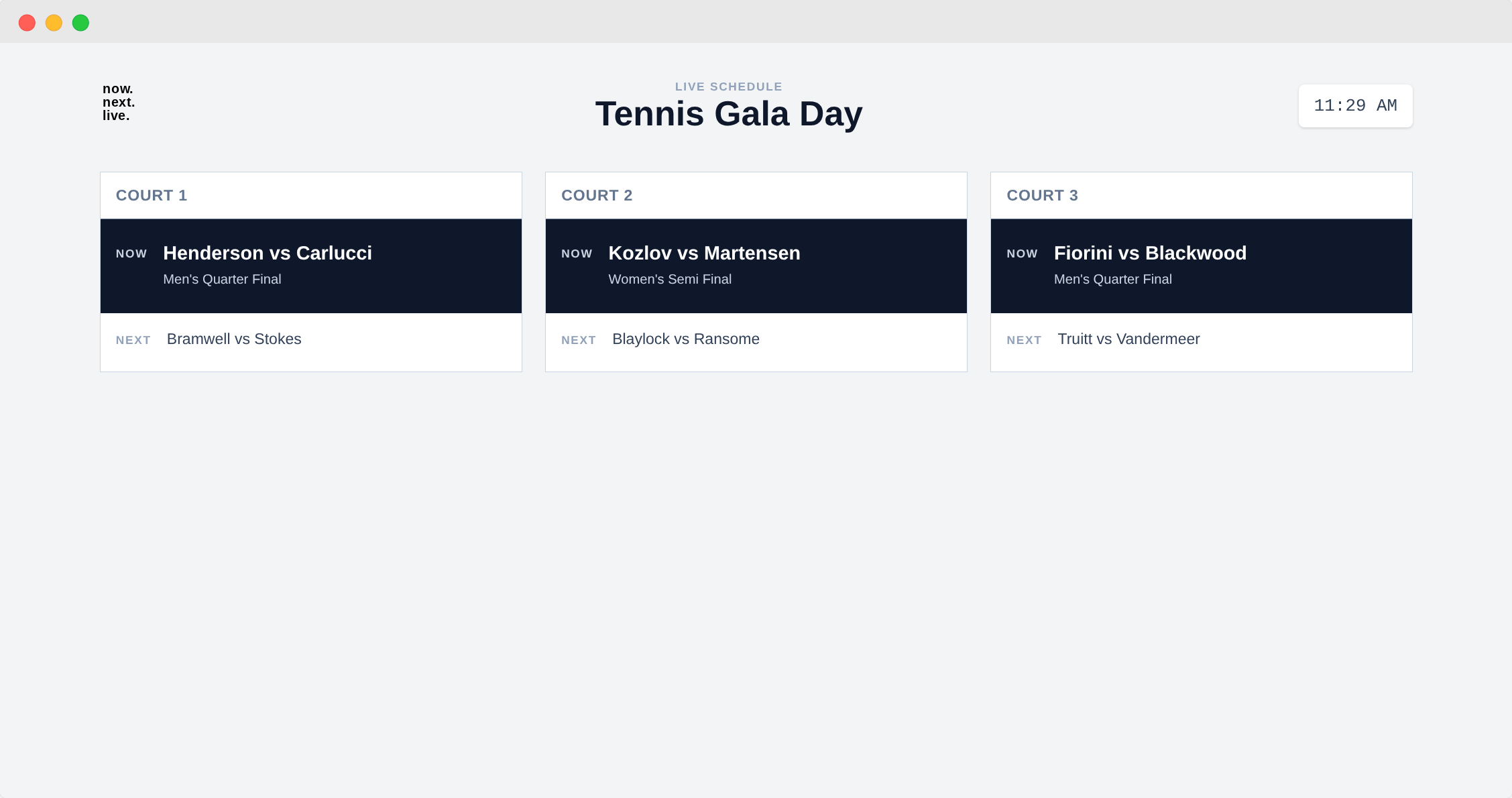
Now let's get your schedule onto screens where everyone can see it:
- Select "Open Display" from your event controller
- Copy the display URL that appears
- Open it on screens, laptops, or tablets around your venue
The display view is optimized for large screens and distance viewing. It uses clear typography, high contrast, and a clean layout that highlights what's happening now and what's coming next.
You can display this on:
- Smart TVs in the clubhouse or main hall
- Laptops at the registration desk
- Tablets that you can move around as needed
- Any device with a browser—if it can show a web page, it can show your schedule
Setup tips:
- Put displays in full-screen mode (usually F11 on computers) to hide browser toolbars
- Adjust brightness so it's readable in your venue's lighting conditions
- If using a TV, adjust power settings so it won't go to sleep mid-tournament
- Consider setting the display URL as the browser's homepage for automatic loading
Participants don't need logins or apps. They simply look at the display. You can also share the URL with players so they can check the schedule on their personal phones—it's completely optional, but many players appreciate having direct access.
Step 6: Run Your Event Smoothly
With the display active and your schedule set up, you're ready to run a professional, stress-free tournament:
Players always know where to be—they can see their next match, their court assignment, and the approximate timing at a glance. No more crowding around noticeboards or interrupting organisers.
Volunteers answer fewer questions—when the information is clear and visible, players find answers themselves. Your volunteers can focus on running the event, not repeating the same information all day.
Matches start on time—players know when they're up, courts don't sit empty, and the tournament flows smoothly from start to finish.
The tournament feels more professional—a clean digital display gives your event a polished, organised appearance that impresses players, sponsors, and visitors.
You'll notice the difference immediately. The atmosphere is calmer, the flow is smoother, and you'll actually have time to enjoy running the event instead of constantly firefighting schedule issues.
FAQ
Do I need special hardware?
No. Any screen that can open a web browser will work perfectly.
This includes:
- Regular computers or laptops
- Tablets (iPads, Android tablets, etc.)
- Smart TVs with built-in browsers
- Regular TVs connected to a laptop or streaming device
- Old monitors connected to a Raspberry Pi or similar device
If you can open a web page on it, you can display your tournament schedule on it. You don't need to buy any special equipment—use whatever screens you already have available.
Can multiple organisers update the schedule?
Yes! Multiple co-organisers can log in and update the same event simultaneously.
This is particularly useful for larger tournaments where you might have:
- One person managing court assignments
- Another person updating match results
- A third person handling timing adjustments
Everyone can work together in real-time, and all changes sync instantly across all displays. Just make sure your co-organisers have the controller URL and appropriate login credentials.
What happens if Wi-Fi drops?
Displays hold the last known information and resynchronise once the connection returns.
The system is designed to be resilient. If your internet connection drops briefly, the displays continue showing the current schedule. When the connection returns, they automatically sync any changes that were made while offline.
For venues with unreliable internet, consider:
- Using a mobile hotspot as a backup connection
- Setting up a dedicated Wi-Fi network just for the displays
- Pre-loading the schedule before the event starts
Most tournaments run without any connectivity issues, but it's good to know the system handles brief interruptions gracefully.
How long does setup take?
Most organisers create a working schedule within 10 minutes, even on their first try.
Breakdown:
- Event creation: 1 minute
- Adding courts/spaces: 1-2 minutes
- Adding sessions: 5-10 minutes (depending on tournament complexity)
- Setting up displays: 2-3 minutes
Total: 10-15 minutes for your first event. Once you're familiar with the system, you can set up a new tournament in under 5 minutes.
Many organisers create their event days or weeks in advance, setting up the structure and refining details as the tournament date approaches. On event day, everything is ready to go—just open the displays and start updating results.
Can I reuse schedules for recurring tournaments?
Yes! If you run the same tournament format regularly, you can use a previous event as a template.
Simply duplicate a past event, update the date and any specific details, and you're ready to go. This is perfect for weekly club tournaments, monthly competitions, or annual championships that follow the same structure each time.
Do players need to download an app?
No. The display works in any web browser—no downloads, no installations, no accounts required for players.
If you want to share the schedule with players, just give them the display URL. They can open it on their phone's browser and check the schedule anytime. It's completely optional—some organisers prefer to only show the schedule on venue screens, while others love giving players direct access.
The display URL is read-only, so players can view the schedule but can't accidentally change anything.
Conclusion: Run Your Best Tournament Yet
Running a smooth tournament doesn't require expensive equipment, technical expertise, or hours of preparation. It just requires the right system—one that's flexible, clear, and designed for real-world tournament conditions.
NowNext.live gives you everything you need: instant updates, clear displays, and a simple interface that anyone can use. Your volunteers will spend less time managing schedules and more time creating a great experience. Your players will always know where to be and when. And you'll run a professional, stress-free event that people actually enjoy.
Ready to try it? Head over to NowNext.live and create your first tournament. It's free to start, takes less than 15 minutes to set up, and you'll wonder how you ever managed with paper schedules and whiteboards.
Your next tournament can be your smoothest one yet.
Questions about running tournaments with NowNext.live? We're here to help—reach out at hello@nownext.live.