
Running a sports tournament should be exciting — for the players and for you. But for most organisers, tournament day means paper schedules that are wrong before the first match starts, volunteers rewriting the same board all afternoon, and a queue of players outside your desk asking the same question on repeat.
It doesn't have to be this way. Most tournament chaos traces back to a single problem: there's no central, real-time place for everyone to see what's happening. Fix that, and everything else falls into place.
This guide covers why tournament scheduling breaks down, what a well-run event actually needs, and how to set up a live schedule display using NowNext.live — in under 15 minutes.
Why Tournament Scheduling Breaks Down
The problems are almost always the same, regardless of the sport or venue. Here's what's really happening:
Last-minute changes are inevitable — the question is whether you can handle them
Matches overrun. A player pulls out. Weather forces you to shuffle court assignments. These things happen at every tournament. The issue isn't the changes themselves — it's that paper and whiteboards can't adapt fast enough.
That semi-final that was supposed to wrap up at 2:00 PM? It's now 2:30 PM and still going. With printed schedules, your entire afternoon is now wrong. You're either reprinting everything or making verbal announcements that half the venue won't catch. One delayed match ripples through every session that follows, and without a flexible system you're permanently on the back foot.
Paper and whiteboards become unreadable under pressure
A printed schedule is accurate for exactly as long as nothing changes — which is usually about twenty minutes. Whiteboards help, but they have their own problems.
By mid-afternoon, that clean morning board is a mess of crossed-out names, arrows pointing in three directions, and margin notes only the person who wrote them can decipher. Players squint at it trying to decide if that says "Court 3" or "Court 8". Different volunteers have different handwriting. Someone erases too much. The marker dies mid-update. What started as a communication tool has become the main source of confusion.
When no one knows what's happening, everyone asks you
When players can't see a reliable schedule, they do what's natural: they ask.
"What court am I on?" "Did the time change?" "Am I in the next round?" "Has anything moved?"
Each question takes time to answer. While you're answering one, three more have queued up. And here's the trap: the more time volunteers spend answering questions, the less time they have to update the schedule — which makes it more out of date — which generates even more questions. It's a loop, and it drains everyone.
Volunteers end up doing the wrong job all day
Your volunteers came to help run a great event. Instead, they spend the day rewriting boards and repeating themselves.
Do the maths: a volunteer who spends 15 minutes every hour on whiteboard admin during an 8-hour tournament loses 2 full hours to manual updates. Multiply that across multiple volunteers and a full season, and you're looking at hundreds of wasted hours per year. Hours that could be spent welcoming players, managing logistics, handling the things that actually require human judgment — or just enjoying the event.
What a Well-Run Tournament Actually Needs
Strip back the noise, and a smooth tournament needs four things:
Clear visibility for everyone
Players should never have to wonder where they need to be or when they're playing. A central live schedule removes that uncertainty entirely.
When players can glance at a screen and immediately see their next match, their court, and the approximate timing, they can plan their day. They know when to warm up, when to grab a coffee, and when to be ready courtside. Clear visibility means players check the display instead of asking you.
Updates that appear the moment you make them
If a match finishes early or a court reassignment is needed, everyone should see that change within seconds — not after an announcement that some players missed.
Real-time updates mean you can run the tournament as it actually unfolds, not as you planned it at 8am. A court frees up? Pull the next match forward. A match overruns? Push the following session back. The display reflects reality the instant you update the controller.
One schedule that controls everything
Multiple boards, printed sheets, and group chat messages always produce discrepancies. Discrepancies produce confusion. The fix is one source of truth, visible everywhere.
With a single live display, the TV in the clubhouse, the tablet at the desk, and every player's phone all show identical, real-time information. No conflicting versions. No "but the board said..." The schedule on every screen matches, and everyone knows it's current.
Volunteers who can actually run the event
When the schedule is clear, accurate, and trustworthy, players stop interrupting. They find the information themselves. Your volunteers are free to do what they actually signed up for: manage logistics, welcome players, handle disputes, and make the day feel well-organised.
A good system handles the routine communication automatically so your team can focus on the things that require genuine human attention.
Step by Step: Running Your Tournament with NowNext.live
Ready to set up your smoothest tournament yet? The whole process takes about 10–15 minutes, even if you've never used the system before.
Step 1: Create a New Event
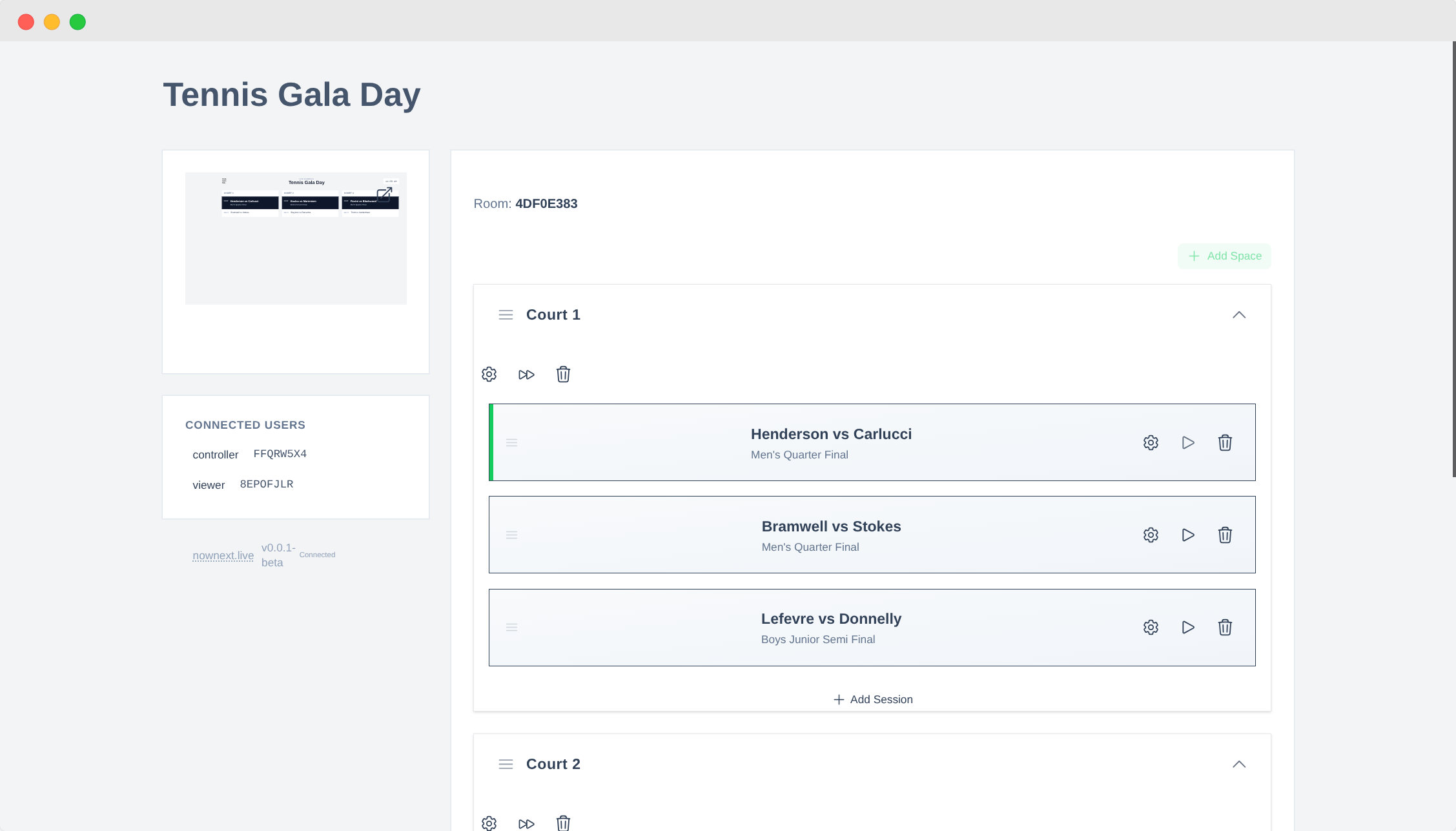
Head to nownext.live and log in (or create a free account). Select Create Event and give it a clear, recognisable name — "Spring Tennis Tournament 2025" or "Junior Badminton Championships" works well.
The system generates a unique URL for your event. This URL powers both the controller (where you manage everything) and the display (what players see). Keep it handy — it's the key to your whole setup.
Give your event a descriptive name you'll recognise later, especially if you run multiple tournaments throughout the year. Past events can be duplicated as templates, so good naming now saves time later.
Step 2: Set Up Your Spaces
NowNext.live calls your playing areas Spaces — courts, rinks, lanes, pitches, or any area where matches happen.
Open the Spaces section and add each one by name, using the exact same labels as your venue — if the court signs say "Court A", use "Court A", not "Court 1". The fewer translation steps in a player's head, the better. Drag to reorder them so they appear in the right sequence on the display.
Add as many or as few as your event needs. The display adapts automatically.
Step 3: Add Sessions and Rounds
Now for the actual schedule. Open the Sessions section and add each round, time block, or phase of play. Each session can include:
- Round names — "Round 1", "Quarter Finals", "10:00 AM Block"
- Match information — player names, team names, or match numbers
- Timing details — start times or estimated durations
- Space assignments — which court or pitch each match is on
- Notes — "Winner plays at 3 PM", "Weather permitting"
Don't stress about getting everything locked in upfront. You can add, edit, and reorder sessions at any point — even mid-event. Most organisers create a rough outline before the day and refine it in real time as matches progress.
Step 4: Update on the Fly
This is where NowNext.live earns its place. During the event, make changes from your phone or laptop and they appear on every connected screen instantly:
- Update results as matches finish
- Adjust match pairings if players withdraw or brackets change
- Reorder sessions if matches finish early or run late
- Add or remove rounds as the tournament structure evolves
- Reassign courts if a space becomes unavailable
- Update timings to reflect actual progress
Every change propagates to every connected display within seconds. No announcements. No reprinting. No running across the venue.
Real scenario: A quarter-final wraps up 20 minutes early. You pull the next match forward in the controller, update the timing, and it's done. Players see it on their phones, head to the court, and the tournament keeps moving without a pause.
Step 5: Get It on Screens
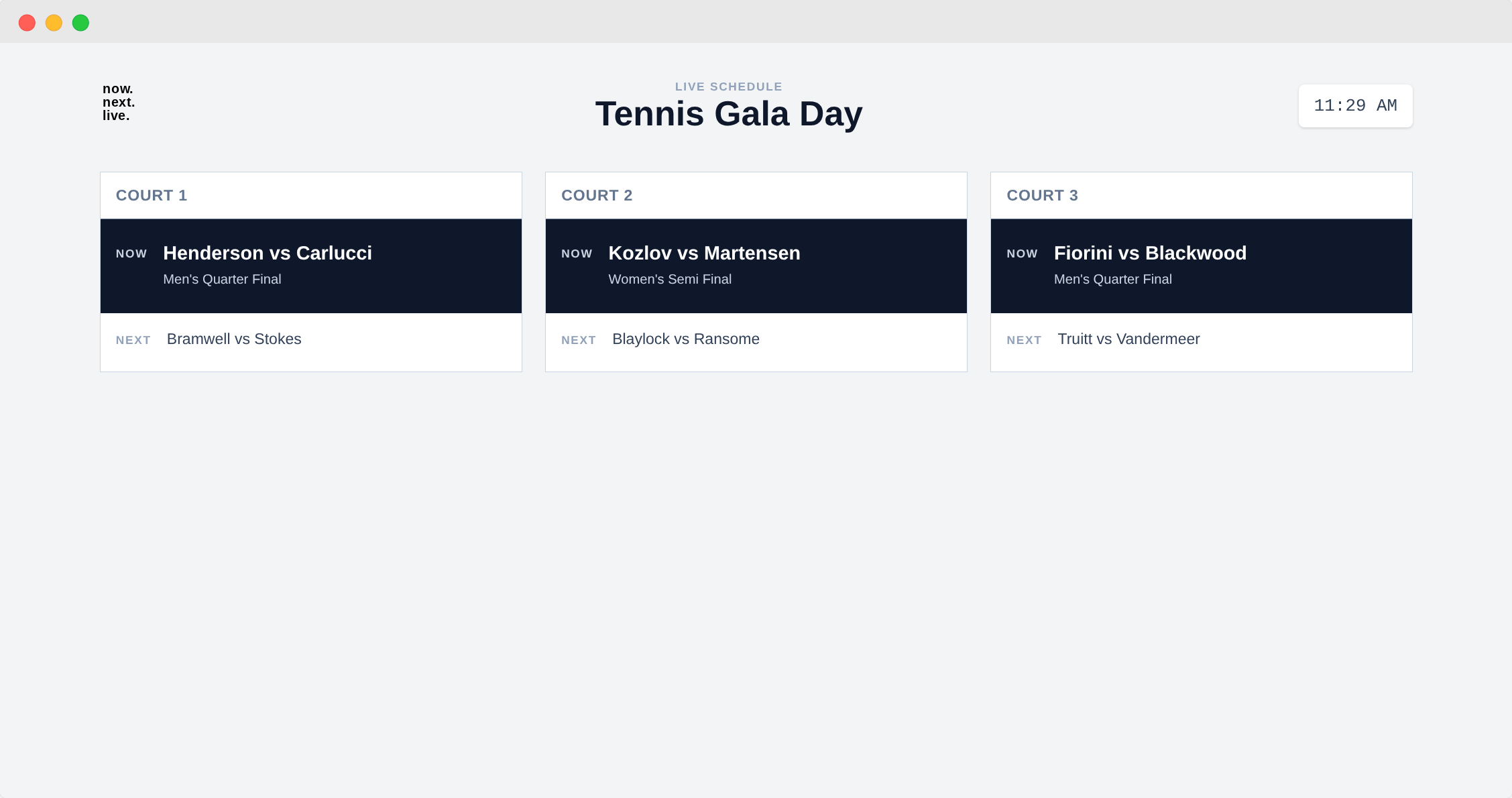
Select Open Display from your event controller. You'll see your schedule in its full, screen-optimised format — large text, high contrast, clean layout built for visibility across a busy venue.
Open this URL on every screen you can:
- Smart TVs in the clubhouse or main hall
- Laptops at the registration desk
- Tablets that can be moved around as needed
- Any device with a browser — if it loads a web page, it can show your schedule
Tips to make it work well:
- Use full-screen mode (F11 on most computers) to remove browser chrome
- Adjust brightness for your venue's lighting
- Disable sleep mode on any screen that needs to run all day
- Set the display URL as the browser's homepage so it auto-loads when screens are turned on
Open it on as many screens as you want — no limits, all updating in perfect sync.
Players don't need logins or apps. They can look at venue screens or open the URL on their own phones. The display is read-only, so nothing can be accidentally changed.
Step 6: Run the Day
With everything set up, this is what your tournament actually feels like:
Players always know where to be. They glance at the screen — court assignment, match time, what's coming next. No crowding around the organiser's desk.
Volunteers answer far fewer questions. When the information is visible and trustworthy, players find answers themselves. Your team can focus on actually running the event.
Matches start on time. Players know when they're up. Courts don't sit empty. The tournament flows from start to finish.
The whole thing looks professional. A clean digital display signals to players, visitors, and sponsors that this is a well-organised event. That impression matters.
You'll notice the difference almost immediately. The atmosphere is calmer. The day flows. You'll actually have time to enjoy the tournament you've spent weeks planning.
Common Questions
Do I need special hardware?
No. Any screen that can open a web browser works perfectly — laptops, tablets, smart TVs, regular monitors connected to a laptop or Raspberry Pi. If it can load a web page, it can display your tournament schedule. No special equipment to buy; use what you already have.
Can multiple organisers update the schedule?
Yes. Multiple co-organisers can log in and update the same event simultaneously — useful for larger tournaments where one person manages court assignments, another updates match results, and a third handles timing. All changes sync instantly across every display.
What happens if Wi-Fi drops?
Displays hold the last known schedule and re-sync automatically the moment the connection returns. The system is designed to handle brief interruptions gracefully.
For venues with unreliable internet: a mobile hotspot as a backup, or a dedicated Wi-Fi connection just for display screens, both work well. Pre-loading the display before the event starts also helps in case early connectivity is better.
How long does setup take?
Most organisers create a working schedule within 10 minutes, even on their first try:
- Event creation: ~1 minute
- Adding courts/spaces: ~1–2 minutes
- Adding sessions: ~5–10 minutes depending on complexity
- Setting up displays: ~2–3 minutes
Total: 10–15 minutes for your first event. Once you know the system, under 5 minutes for repeat events.
Many organisers build the full structure days or weeks in advance, then just open the displays and start updating results on tournament day.
Can I reuse a schedule for recurring tournaments?
Yes. If you run the same format regularly, duplicate a previous event to use as a template. Update the date and any specifics, and you're ready. Perfect for weekly club nights, monthly competitions, or annual championships that follow the same structure each time.
Do players need to download an app?
No. The display works in any web browser — nothing to download, nothing to install, no accounts required for players. Share the display URL and they can check the schedule on their phone at any time. The URL is read-only, so nothing can be accidentally changed.
Run Your Best Tournament Yet
Running a smooth tournament doesn't require expensive equipment, technical know-how, or hours of prep. It just requires the right system — one that's flexible, clear, and built for real-world tournament conditions where things change constantly.
NowNext.live gives you instant updates, clear displays, and a controller simple enough that anyone on your team can use it. Volunteers spend less time managing schedules and more time creating a great day. Players always know where to be. And you run an event that actually feels professional.
Ready to try it? Head to NowNext.live and create your first tournament for free. You'll be set up in under 15 minutes — and you'll wonder how you ever managed with paper schedules and whiteboards.
Your next tournament can be your smoothest one yet.
Questions? We’re here to help. Reach out at hello@nownext.live.