
A player arrives at the wrong court. Another misses their match entirely — no one told them it moved forward. Someone taps you on the shoulder mid-conversation: "Am I on next?" It's the fourth time they've asked today.
You're trying to run an event. Not a help desk.
This is the reality for most amateur sports organisers, and the frustrating part is that it's entirely avoidable. Poor communication isn't a people problem — it's a systems problem. When your schedule lives across WhatsApp messages, printed sheets, and a whiteboard that's already three changes out of date, confusion is guaranteed.
A single live-updating schedule fixes all of it. Here's why communication breaks down at sports events, and exactly how to solve it.
Why Communication Always Breaks Down
The problems tend to be the same regardless of the sport, the venue, or the size of the event. Here's what's really happening:
The information is scattered everywhere
You post the schedule in the clubhouse. You send an update in the group chat. Someone writes changes on the whiteboard. A volunteer makes an announcement over the hall. But did everyone see the WhatsApp message? Did they check the board? Were they within earshot?
The result: different players have different information, and nobody can agree on what's actually happening. That fragmentation — information spread across too many channels — is the root cause of most communication problems at sports events.
Last-minute changes don't reach everyone
Things always change at live events. A match finishes early. A player withdraws. A court becomes unavailable. These aren't failures of planning — they're just reality. The problem is that communicating those changes in real time is nearly impossible through traditional methods.
By the time you've updated the printed schedule, sent a group chat message, and tried to verbally notify every affected player, someone has already shown up in the wrong place at the wrong time.
In a busy tournament with matches every 15 minutes, you simply cannot keep up with manual updates. The event moves faster than the information can.
There's no single place to check
When players don't have one reliable source of truth, they ask volunteers. Which creates a feedback loop: the more questions volunteers answer, the less time they have to update information, which leads to more questions.
One player checks the printed schedule. Another relies on the group chat. A third asks a volunteer who might not have the latest update. Everyone ends up with a different version of reality — and your event grinds to a halt trying to reconcile them.
Volunteers spend all day answering the same questions
"What court am I on?" "When's my match?" "Has the schedule changed?" "Am I playing soon?"
Your volunteers didn't sign up to be walking information kiosks. They want to help run a smooth event, welcome players, manage logistics, and handle the hundred tasks that make a tournament actually work.
Instead, they're stuck on repeat. After a full day of constant interruptions, even the most enthusiastic volunteers are exhausted — and your event is worse for it.
The Fix: One Live Display Everyone Can Trust
The solution isn't complicated. Give everyone access to the same live information — all in one place, always current.
One screen, no confusion
When there's a single authoritative display that everyone knows is always up-to-date, players stop asking questions. They check the screen instead.
That trust is what makes it work. If players have any doubt that the display might be out of date, they'll keep asking. But when the display is always current — because it updates the moment you make a change — it becomes the automatic first port of call.
With NowNext.live, every connected screen shows identical, real-time information. No conflicting sources. No "I thought it said..." moments.
Every screen updates the instant you make a change
Change a court assignment on your phone. Within seconds it's on the TV in the main hall, the tablet at the registration desk, and every player's phone. No reprinting. No rewriting. No running around the venue making announcements.
A match finishes early and you want to move the next one forward? One update in the controller. Done. Everyone knows.
Volunteers get their time back
When information is visible, accessible, and trustworthy, players answer their own questions. "What court am I on?" becomes a glance at the screen. "When's my match?" is answered before the question is even formed.
Your volunteers can finally focus on what they actually came to do: make your event run brilliantly.
Players feel confident — and that changes everything
When players know exactly where to be and when to be there, the entire atmosphere shifts. They're relaxed between matches instead of anxiously hovering near the desk. They arrive on time, in the right place. Matches start when they're supposed to.
When communication works, everything else works better.
Step by Step: Keeping Everyone Informed with NowNext.live
The setup takes about 10 minutes. Here's exactly how it works:
Step 1: Create an Event
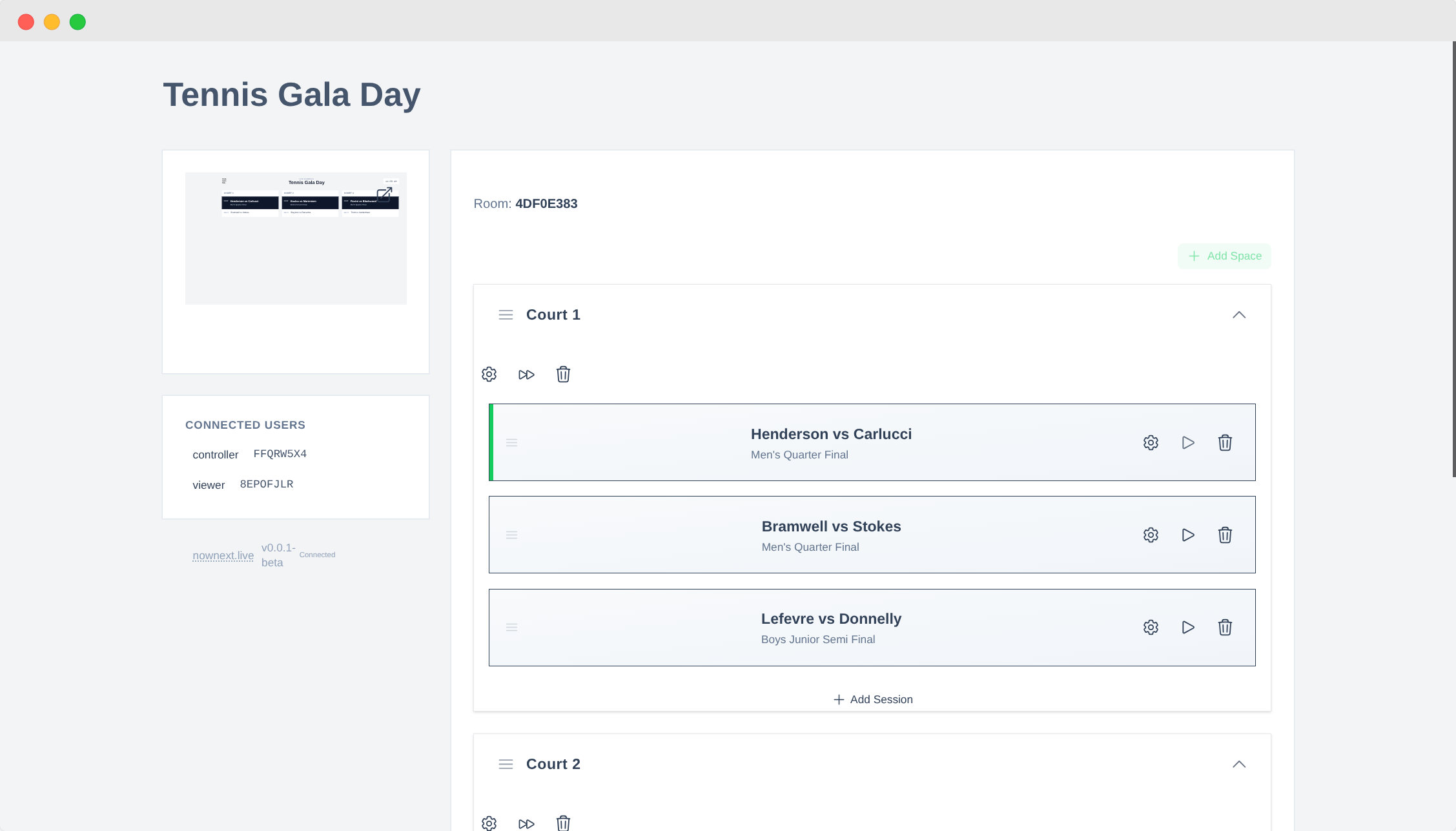
Head to nownext.live and log in (or create a free account). Hit Create Event and give it a clear name — "Saturday Club Tournament" or "Junior Championships March 2025" works well.
The system generates a unique URL with two views: a controller where you manage the schedule, and a display that players see. Keep this URL handy — you'll use it throughout the event.
Step 2: Add Spaces
NowNext.live calls your playing areas Spaces — courts, rinks, pitches, lanes, or whatever your venue uses.
Open the Spaces section and add each one by name. "Court 1", "Court 2", "Main Rink", "Pitch A" — whatever matches how they're labelled in your venue. Drag to reorder them so they appear in the right sequence on the display.
Pro tip: Name your spaces exactly as they appear on your venue's signage. The fewer translation steps in a player's head, the better.
Step 3: Add Sessions
Now for the actual schedule. Open the Sessions section and add each round, time block, or match. Each session can include:
- Match names or numbers ("Semi Final 1", "Match 7")
- Player names or team names
- Start times (or leave blank for flexible scheduling)
- Which space it's assigned to
- Any notes or special information
Don't stress about perfection upfront. You can add, edit, and reorder sessions at any point — even mid-event.
Organiser tip: Create all your sessions in advance but leave start times flexible. Update them as the event progresses. You get structure with the freedom to adapt.
Step 4: Share the Display Link
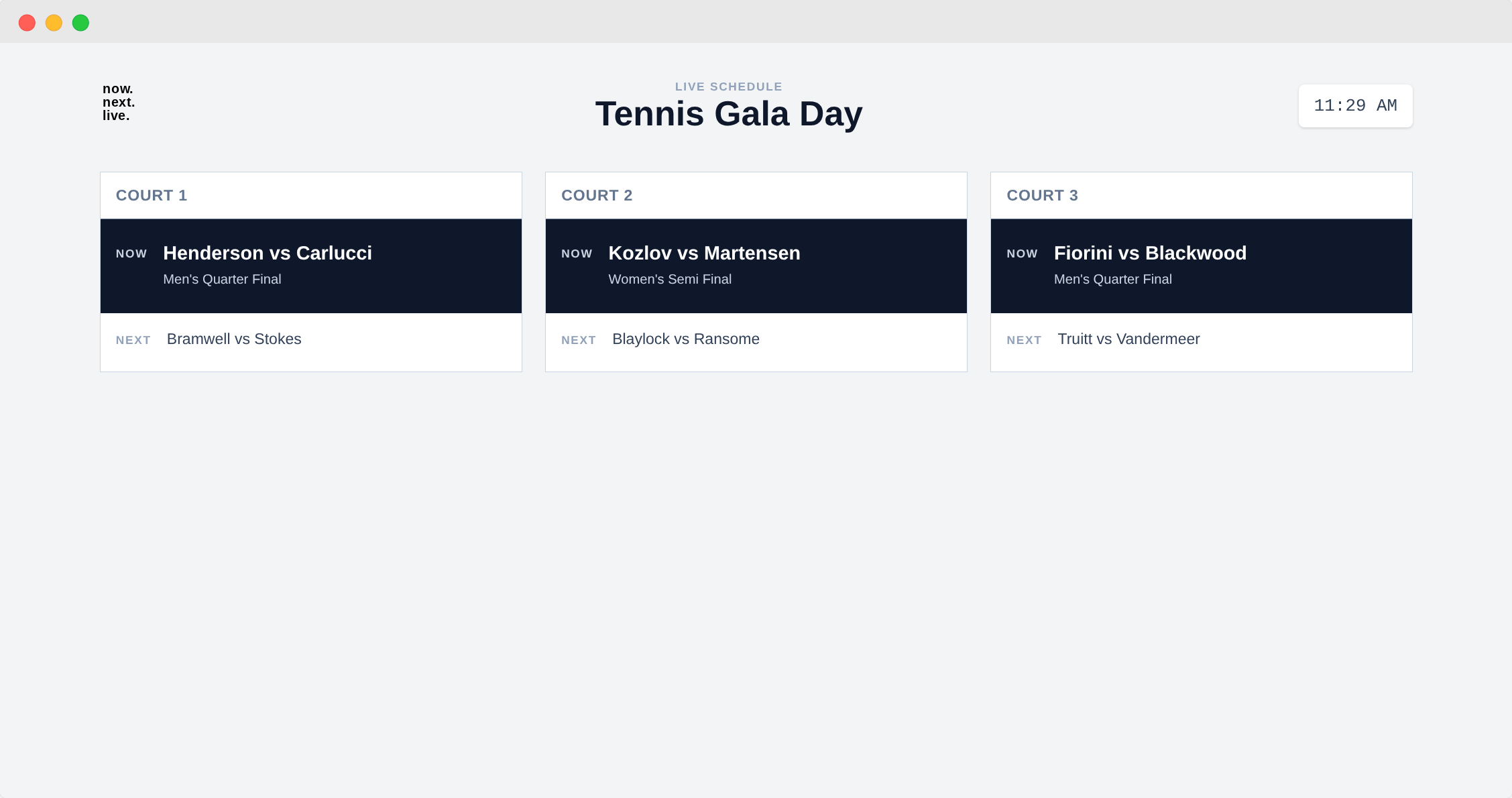
Select Open Display from your controller. You'll see the schedule exactly as your players will — large text, high contrast, clean layout built for readability across a venue.
Put this display URL on every screen you have available:
- Large TV in the main hall — so everyone sees it at a glance
- Tablet at the registration desk — for quick reference
- Laptop in the office — so organisers can monitor remotely
- Share the URL with players — so they can check on their own phones
Tips to make it shine:
- Full-screen mode (F11 on most computers) hides browser toolbars
- Adjust brightness for your venue's lighting
- Disable sleep mode on any screen that needs to run all day
- Set the display URL as the browser's homepage for automatic loading
Open it on as many screens as you want — no limits, all in perfect sync.
Step 5: Update on the Fly
This is where it gets genuinely powerful. As your event progresses, make changes from any device and watch them appear everywhere instantly:
- Mark a match complete — it moves off the current view
- Change court assignments — one update, every screen reflects it
- Adjust timings — push a session back when a match overruns
- Add or remove sessions — handle withdrawals or last-minute changes
- Reorder the schedule — drag sessions to reflect the actual flow
Real scenario: A match overruns by 20 minutes. Under the old system, you'd rewrite the entire schedule and try to notify every affected player individually. With NowNext.live, you adjust the start time in the controller. Every screen updates. Players see it on their phones. The event carries on — and you didn't even break stride.
Real-World Impact
Clubs and event organisers who've made the switch report real, measurable improvements:
70–80% fewer interruptions — according to volunteers, the drop in "what's happening next?" questions is dramatic. When the information is visible and trustworthy, players look instead of ask.
Events that run more smoothly — with less time spent on schedule management, everything flows better. One organiser told us: "We used to have someone dedicated to updating the whiteboard all day. Now I handle the entire schedule from my tablet while also managing registrations and greeting players. It's been transformative."
Happier players — accurate, accessible information means players arrive in the right place at the right time. The stress of "did I miss something?" disappears.
A more professional impression — a clean digital display signals that your event is well-organised. That matters when you're trying to attract new members, sponsors, or bigger events to your venue.
Volunteers who come back — when they can focus on actually helping rather than fielding the same questions on repeat, they enjoy the day more. And they're far more likely to help again.
Common Questions
How many screens can we use?
As many as you want — there's no limit. All connected screens update simultaneously.
A large TV in the main hall, tablets at multiple registration points, a laptop in the office, and every player's phone can all show the same live schedule at once. Wherever players are, the information is there.
Do players need to download an app?
No. They simply open the display URL in any web browser on their phone — or look at one of the venue screens.
Nothing to download, nothing to install, no accounts required for players. The display URL is read-only, so they can view but not edit the schedule.
What if the schedule changes mid-event?
Updates appear on every connected screen within seconds of you making a change in the controller.
Whether you're adjusting a single match time or restructuring the entire afternoon, every player sees the latest information immediately. That real-time reliability is exactly what builds trust in the display — and stops the questions.
Does it work for all sports?
Yes. Any event with matches or sessions benefits from clear, live communication.
NowNext.live works brilliantly for:
- Team sports — football, basketball, netball
- Racket sports — tennis, squash, badminton
- Bowls tournaments
- Swimming competitions with multiple events
- Athletics meets
- Multi-sport events
- Esports tournaments
- Conferences with multiple rooms or tracks
If you need to schedule activities across multiple spaces and keep participants informed, it works.
What does it cost?
There's a free tier that works well for small clubs and occasional events. Paid plans unlock unlimited events, custom branding, and advanced scheduling features.
See current pricing at nownext.live/pricing.
What if our internet is unreliable?
The display is built to handle it. Once loaded, it continues showing the last known schedule even if the connection drops briefly. When connectivity returns, it automatically syncs any changes you've made.
For venues with consistently poor internet, a mobile hotspot dedicated to display screens is an easy fix. The display doesn't require high bandwidth — just a stable connection for updates.
Communication Made Simple
Clear communication at sports events doesn't require expensive equipment, technical expertise, or hours of prep. It just requires one live-updating display that everyone can see and trust.
When players know where to be and when to be there, everything runs more smoothly. Delays drop. Stress drops. Your volunteers get to focus on making it a great day — not on answering the same question for the tenth time.
Ready to fix communication at your events? Head to NowNext.live and create your first event for free. You'll have a live display running in under 15 minutes — and you'll wonder how you ever managed without it.
Your volunteers will thank you. Your players will thank you. And you'll spend less time managing communication and more time running successful events.
Questions about keeping participants informed at your events? Reach out at hello@nownext.live — we're always happy to help!